

Cozyla Calendar Plus 2: A Smart Family Hub for Schedules, Chores and Meal Planning

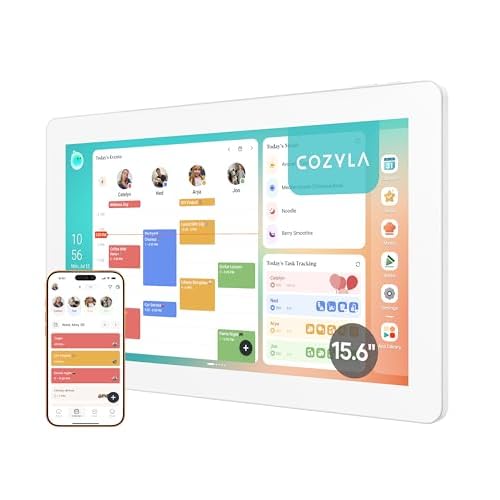
Keeping a family organised can mean juggling calendars, school activities, chores, meal plans and shopping lists across different apps and devices. The Cozyla Calendar Plus 2 brings these everyday tasks onto one shared 15.6-inch touchscreen, giving families a central place to see and manage what needs to happen.
Why This Is More Than a Digital Calendar
The main reason to consider the Calendar Plus 2 is its ability to combine several household tools in one screen. It can sync calendars from Google, Apple, Outlook, Yahoo and other services without requiring a subscription according to the product listing, while the Cozyla+ companion app allows events to be shared and edited remotely.
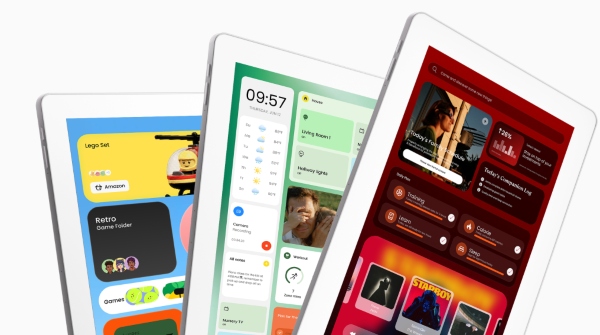
The dashboard is also customisable, with widgets for calendars, chore charts, meal planning, to-do lists, weather and media. This makes it more useful than a traditional wall calendar for households that want more than a schedule displayed in one place.
The Features That Can Make Family Life Easier
The chore chart and reward system is one of the more practical family features. Family members can use different colours and avatars, while points can be assigned to chores and routines. Customer feedback frequently highlights the chore system as useful for keeping children involved in household responsibilities.
Meal planning is another area where the device goes beyond scheduling. Users can upload recipes, watch cooking content and generate shopping lists, while pantry management helps keep meal preparation connected to the rest of the household routine.
The built-in Cozyla AI Assistant adds another shortcut. The listing says users can use voice commands or scan photos and URLs to turn paper-based events and recipes into digital entries, reducing the need to manually type everything.
One Screen Everyone Can Actually See
A major advantage is the shared-screen approach. Instead of expecting every family member to check the same phone app, the 15.6-inch display can act as a visible household command centre.
Recent customer feedback describes using it for school schedules, family events, meals, projects and chores, while other users mention shared calendars, colour-coded schedules and routine tracking. That makes the product particularly relevant for busy households that need shared visibility, rather than individuals looking for a simple personal calendar.
What Makes It Worth Considering?
The strongest reason to buy is the combination of organisation tools rather than any single feature. Calendar syncing, chores, meal planning, shopping lists, notes and other widgets can replace several separate household systems with one central display.
Customer feedback also supports its everyday usefulness: reviews mention responsive touchscreen controls, easy customisation, Google Play access, simple setup and the absence of subscription fees for core features.
It is therefore most compelling for families who will actually use several functions every day, rather than treating it as a digital version of a paper calendar.
What Should You Check Before Buying?
There are a few points worth checking. The listing describes syncing without a subscription, but one recent customer review raised concerns about a subscription service, so current terms are worth confirming before purchase. The device is also better suited to households that want a large shared touchscreen and multiple organisation features. If you only need a basic calendar, many of its additional functions may not be necessary.
Questions Buyers Often Ask
Q1. Can Cozyla Calendar Plus 2 sync with existing calendars?
A: The listing says it can sync with Google, Apple, Outlook, Yahoo and other calendar services.
Q2. Does it support chore charts?
A: Yes. It includes a chore and reward system with family colours, avatars and points.
Q3. Can it help with meal planning?
A: Yes. It supports recipe uploads, cooking content, shopping lists and pantry management.
Q4. Can the dashboard be customised?
A: Yes. Users can customise the dashboard with different widgets and tools.
Q5. Who is it best suited to?
A: It is particularly suited to busy families that want one shared place for schedules, chores, meals and everyday tasks.
Bottom Line
The Cozyla Calendar Plus 2 makes the most sense as a family command centre, not simply a digital calendar. Its combination of shared scheduling, chore management, meal planning, customisable widgets and voice-based tools can make everyday organisation more visible and manageable. For households that will use those functions regularly, it offers a much broader role than a conventional wall planner.